2023/07/05
Adding a Private Note to an Unavailable Profile
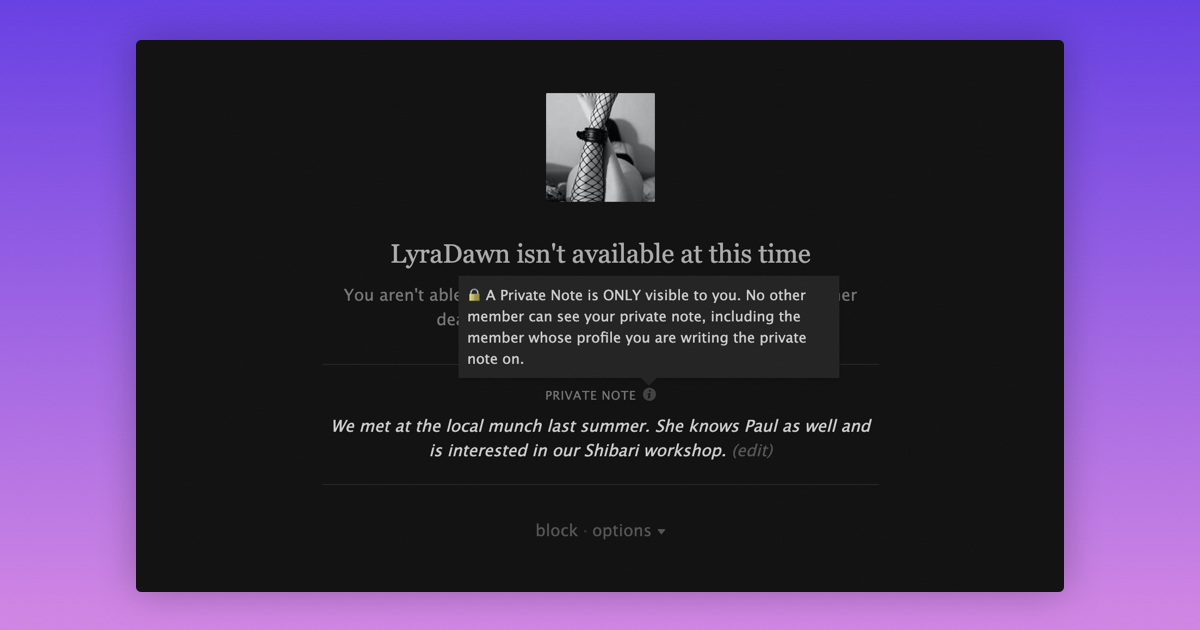
We’re happy to announce that it’s now also possible to add a Private Note to a profile of a member who has deactivated their account, blocked you, is blocked by you, or is on a timeout.
To add or edit a Private Note on a profile of an unavailable member:
- Go to the profile of the member you want to add a note to
- On the “Unavailable” screen, select "Add Note" or "Edit"
- Type in your note (the character limit is 400)
- Save your note
To avoid any confusion regarding the visibility of a Private Note on a profile, we’ve added a tooltip to the feature that makes it clear that the note is only visible to you and you only.
Besides the above, any Private Note that you’ve ever added to a profile will now also be included when exporting your data.
We hope these changes will make the use of Private Notes more useful.