2024/09/12
Ignore All Event Invites from a Specific Person
We’re excited to announce the ability to automatically ignore all open and future event invites from a specific person.
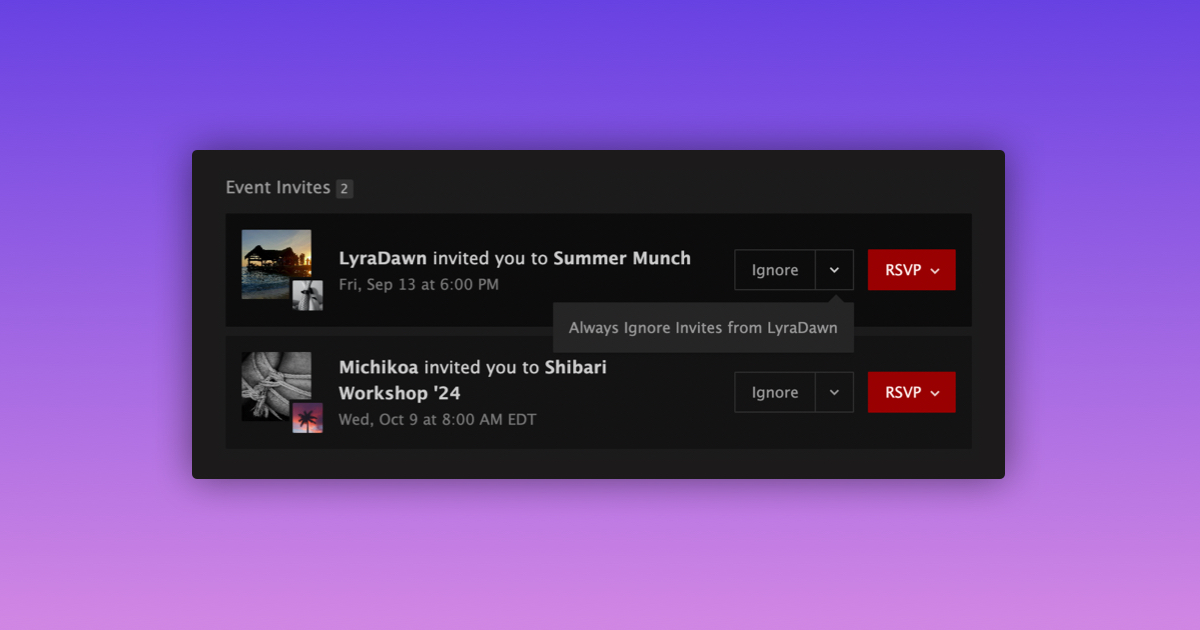
Here’s how to ignore all open and future event invites from a specific person:
- Go to your Requests page
- Find an event invite from the person you want to ignore
- Click the arrow dropdown on the:
- “Ignore” button (desktop), or
- “RSVP” button (mobile)
- Select “Always Ignore Invites from {Nickname}”
From then on, all future event invites from that member will automatically be moved to your Ignored Event Invites page.
If you want to undo an ignored event invite, visit the Ignored Event Invites page and select “Undo.”
To start receiving invites from a specific member again, simply click “Stop Ignoring Invites from {Nickname}”.
We hope this update makes managing your event invites easier.
Stay kinky, my friends!