2026/02/10
Writing Editor Updates
Last month, we introduced a new writing editor that lets you add pictures to writings.
Since then, many of you have shared feedback. We listened.
Here are some of the updates we made based on what you told us:
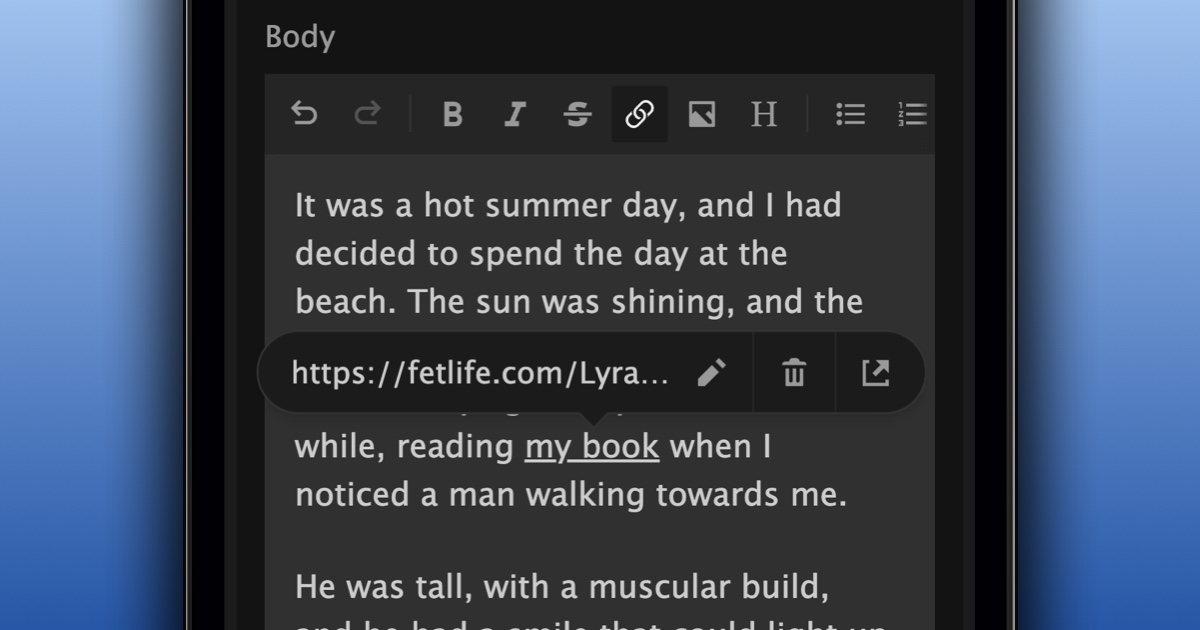
Editing links is simpler
You can now edit a link by selecting the link and clicking the edit icon in the tooltip that appears above the link.
Undo and redo have been added to the toolbar
Undo and Redo buttons have been added to the toolbar for easy access. The addition is especially convenient for those on mobile.
Pressing Enter behaves more cleanly
New lines are clearly separated, and formatting sticks to what you select.
Adding links using markdown
For those who prefer to add links using the [text][URL] format, that is now supported. e.g. FetLife
Copy and paste preserves formatting
When you copy and paste text between writings we make sure to preserve the formatting.
Headers keep their formatting
Pressing `Enter` before a header no longer removes its formatting
Create lists using an asterisk
You can now create a list by typing an asterisk (*) followed by a space.
Indenting affects only the current line
Indenting now only affects the selected line, instead of the entire block
Thanks to everyone who shared feedback and helped shape these improvements.