2026/05/15
Archive Pictures, Videos, and Writings
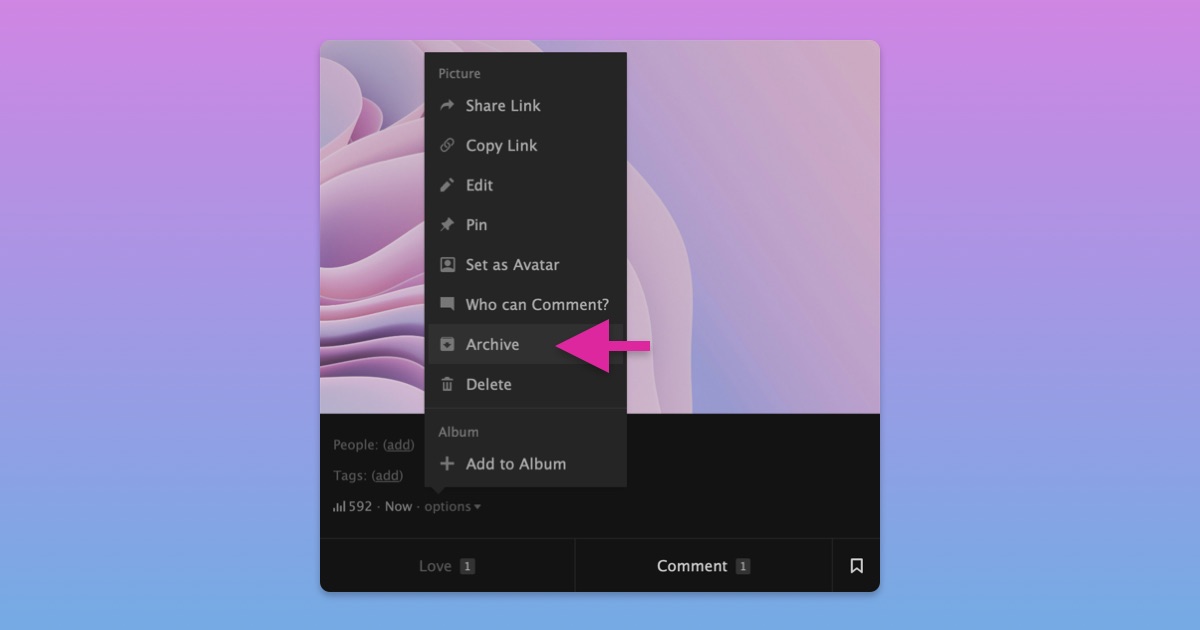
You can now archive pictures, videos, and writings you've posted on FetLife.
When you archive something, it is hidden from other members and only visible to you. You can bring it back anytime by unarchiving it.
To archive something:
- Open a picture, video, or writing you want to archive
- Open the "options" or "..." menu
- Select "Archive"
To unarchive something:
- Open your picture, video, or writing gallery on your profile
- Select the "Your Pictures/Videos" or "Published Writings" filter
- Select "Archived"
- Open the post you want to unarchive
- Select "Unarchive"
We hope this makes it easier to manage what you've shared on FetLife without having to delete it.