2026/10/29
Filter and Message Checked-In Event Attendees
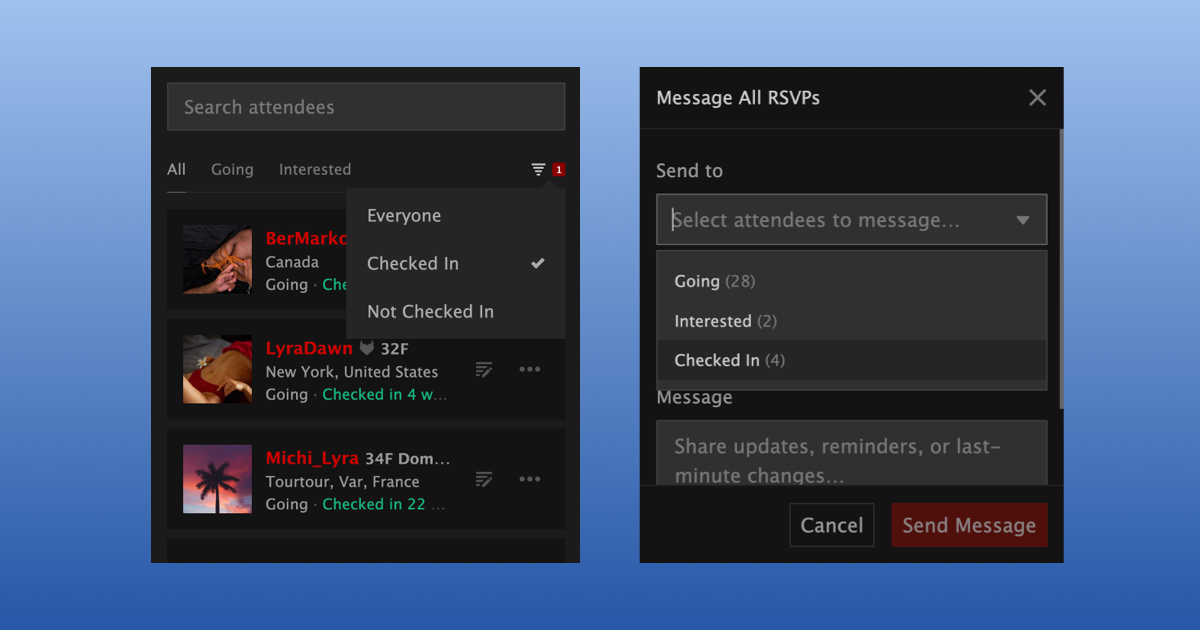
Organizers and co-hosts can now filter their event's check-in list by who has checked in, and bulk message those attendees.
To see who is or isn’t at your event yet:
- Open your event and go to its attendees list
- Select "Check In Attendees"
- Select the filter icon next to the tabs
- Select "Checked In" or "Not Checked In"
The filter works together with the "All", "Going", and "Interested" tabs, so you can see who is Going but hasn't checked in yet.
To message everyone who has checked in:
- Go to your event
- Open the "Manage" tab
- Select "Messages"
- Choose "Checked In" under "Send to"
- Write your message
- Select "Send Message"
We hope this makes it easier to keep everyone who comes to your event in the loop.