2026/11/18
View Group Comments Chronologically
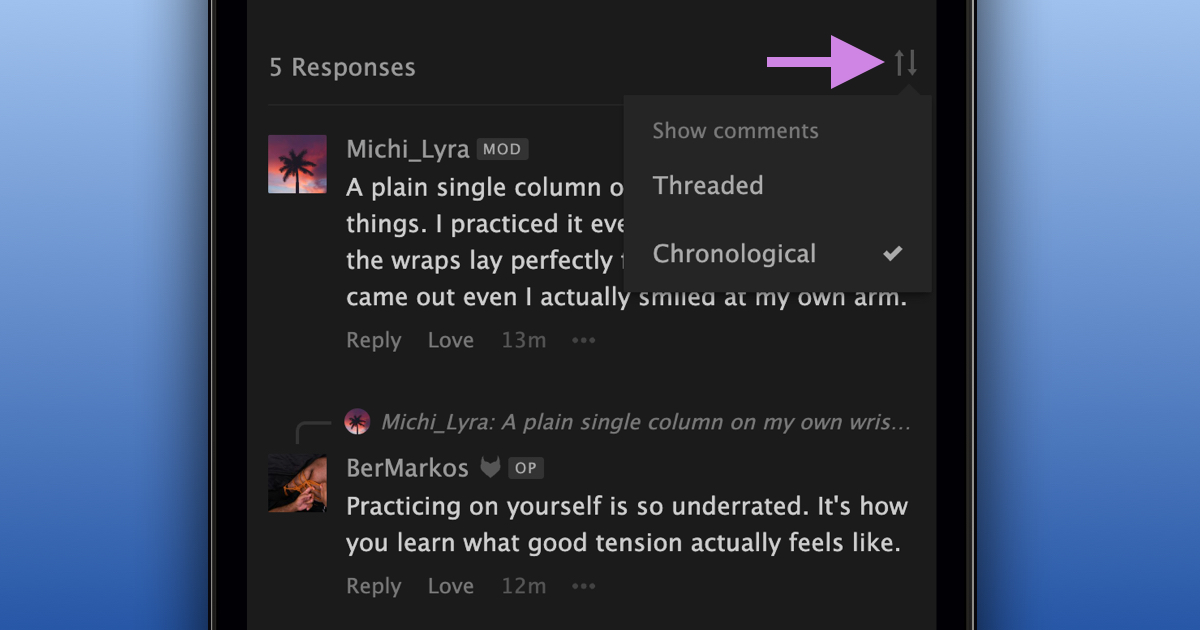
Previously, when comments in a group discussion were threaded, replies were grouped under the comments they were responding to.
You can now also switch to chronological order, so you can follow the conversation as it unfolds.
To change how comments are shown:
- Open a group discussion
- Select the sort icon at the top of the comments
- Choose "Chronological" or "Threaded" under "Show comments"
Threaded (default): Keeps replies grouped under the comments they're responding to, making it easier to follow individual conversations.
Chronological: Shows comments in the order they were posted, while still showing which comment each reply is responding to.
Your preference is saved to your account and applies to all group discussions with threaded comments.
Group discussions without threaded comments already show comments in chronological order, so nothing changes there.
We hope this makes it easier to follow group discussions the way you prefer!