2025/09/10
Copy Link
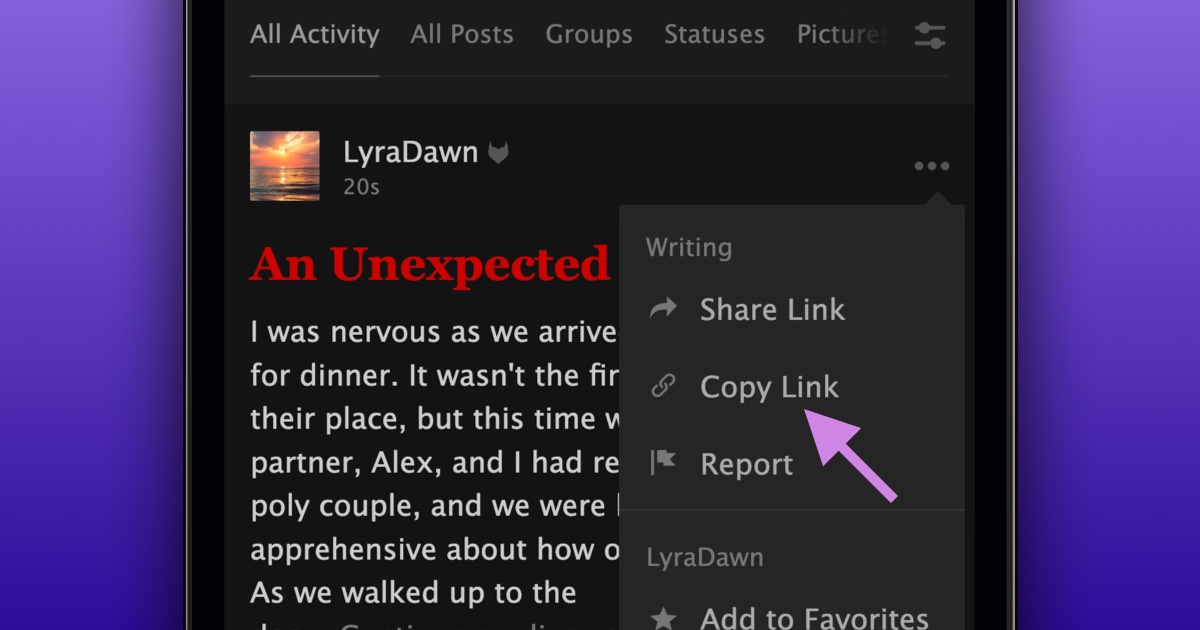
We’re very excited to announce that you can now copy links in the FetLife App, so you no longer need to switch to your browser to copy a link.
To copy a link in the FetLife App:
- Open the content you’d like to get a link to
- Press the “...” or “options” menu
- Choose “Copy Link”
The link is now copied onto your clipboard.
If you haven’t yet, you can install FetLife’s mobile app on your mobile device:
Chrome on Android
- Tap the “···” menu in the top right of your Chrome browser
- Select "Install app"
- Click "Install" in the installation pop-up
Safari on iPhone and iPad
- Tap the Share icon at the bottom of your Safari browser.
- Choose "Add to Home Screen."
- Rename the app (if needed)
- Press “Add” in the top right.
For any other browser, please read our How to Install the Official FetLife App FAQ article.
If you’re having any issues installing FetLife’s mobile app on your mobile device, please don’t hesitate to contact support@fetlife.com.
We hope this change makes using FetLife’s mobile app more enjoyable.